Research Data & AI
What to Know about Using Third-Party Large Language Models (LLMs such as IU-Managed ChatGPT Edu) with Research Data at IU
Updated
November 11, 2025
Published by
IU Research Data Commons
iurdc@iu.edu
Responsible Use of LLMs in Research
Generative AI tools, including large language models (LLMs) such as ChatGPT or Claude, can help you summarize literature, draft documents, write code, and analyze quantitative or qualitative data. But when you conduct research at Indiana University, all research data are considered owned by IU — even if you created the dataset yourself — unless an agreement explicitly assigns ownership elsewhere. That means your research data are subject to IU’s institutional data classification and use policies, and special care must be taken when using research data in third-party LLM services. Of note, no IU research data is currently considered “University-internal” data. Your research data will either be classified as Public, Critical, or Restricted. Please be aware that definitions may change over time.
Unsure of the classification of your data? Check out these examples.
IU Hosted or Created LLM Tools
An important alternative to licensed third-party AI tools at IU is REALLMS (Research and Academic LLM Services), IU’s on-premises, no-cost LLM platform approved for Public, University-internal, Restricted, and Critical data, including Personal Health Information (PHI).
Another alternative is Azure OpenAI at IU, intended for software development teams building applications, tools, or automations that use OpenAI models hosted in the Azure cloud or LLMs hosted in the Indiana University Data Center. Azure OpenAI is approved for Public, University-internal, Restricted, and Critical data.
IU Approved Third-Party LLM Tools (IU LLM Accounts)
IU provides licensed third-party LLM AI tools for use with certain types of your research data. These are IU-managed versions of Microsoft 365 Copilot, Google Gemini, Google NotebookLM, and ChatGPT Edu. They are approved ONLY for IU research data classified as “Public” and only when used with your IU account. If you want to use one of these tools with IU research data classified as Restricted or Critical, contact the Data Steward for Research Data to request prior approval for your specific project.
Personal LLM Accounts
Personal accounts with LLM services like Claude, ChatGPT, or Gemini are not approved for any institutional data, including institutional research data considered “Public”, and can expose sensitive content. When IU contracts with third-party LLM providers, language to protect institutional Public data is included, and these IU data are isolated from other users. Personal accounts do not have these protections.
Where can I read more about the rules?
We recommend starting with this highly relevant Knowledge Base article: “Acceptable use of AI tools with IU research data.”
Can I put my IU research data into a personal free or premium ChatGPT, Claude, or another public AI account?
No. Public LLM versions are not approved because they lack contractual protections and security controls.
What about ChatGPT Edu, Google Gemini at IU, or Microsoft 365 Copilot Chat at IU?
These IU-licensed versions are safe for Public research data if you sign in with your IU account. They are not approved for Restricted or Critical research data. Research data is considered Restricted by default. The University-Internal classification is not used for research data.
How do I know my data classification?
See IU’s Data Classification Matrix. If your classification is unclear, ask the Data Steward for Research Data (datard@iu.edu).
I have restricted, critical, FERPA, HIPAA or other highly sensitive data. What should I use?
Use REALLMS. It runs entirely on IU-owned servers and is approved for Restricted and Critical data, including PHI.
Are these rules final?
No. Vendor terms and IU approvals can change. Check the IU Knowledge Base for the latest approved tools.
I still have questions, where do I go for help?
The IU Research Data Commons can help connect you to the right person to answer your specific questions. Contact iurdc@iu.edu.
Classifying research data can be complicated and context-dependent. The default classification for research data at IU is restricted. To make the case for reclassifying a research data set as public data, you need to provide a clear rationale or describe how all protected data elements have been removed from the data set. You may contact resdata@iu.edu for help with this process.
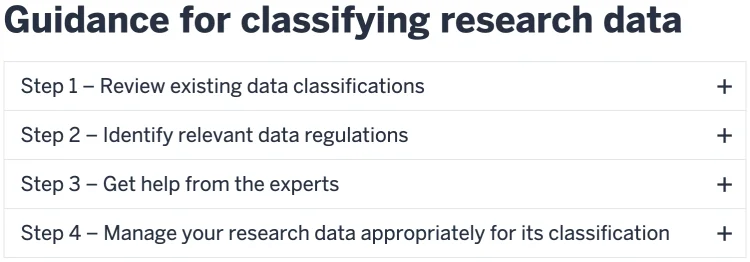
Read this guide on how to classify data.
Public Research Data Examples
- Data on the tissue effects of musculoskeletal resulting from osteoporosis and chronic kidney disease
- Data on water samples in Indianapolis waterways
- Field data from an ecological study of birds
- Genomic sequences for animal species
- Scholarly publication metadata
- Metadata about data sets
Restricted Research Data Examples
- Survey data associated with human participants
- Interviews or focus groups
- Behavioral data about human participants
- Observational data about human participants
- Analysis of specimens
- Electronic and paper files containing research data
- Hard drives containing research data related to the project
- Lab notebooks
- Research protocols used to generate research data
- Restricted-use data sets from the government
- Commercial data sets
- Data scraped from social media platforms
- Limited data sets (under HIPAA)
Critical Research Data Examples
- Research data containing participants' Personally Identifiable Information (PII), Personal Health Information (PHI), or other sensitive data that could cause harm to participants if made public,
- Date of birth
- Phone number
- Address
- Criminal activity
- Audio and Video recordings of human participants
- Photographs and Geolocation of human participants